Practical CDN Caching for Developers


I have written this post for developers who want to figure out how to make their app (even a vibe-coded one) noticeably faster with a CDN. Bigger applications get the most out of it, but even small sites benefit from CDN caching. My goal is simple: get you using a CDN today while sidestepping the mistakes that trip people up.
Why isn't everyone using a CDN?
I'm genuinely puzzled by how many sites (and their developers) don't use a CDN by default. I still see small e-commerce shops and plenty of other sites with real traffic and real money on the line serving pages and product images straight from their origin. They're leaving an easy, often cheaper win on the table.
I first learned what CDNs were when one of my earliest jobs needed some performance work, and we got hit by a DDoS attack at the same time (Speedera was the solution, if I remember right).
A couple of years later, friends at Yahoo told me they'd literally say "let's Akamize it" when they wanted to speed something up.
I've used CDNs on and off across my products ever since. I found Cloudflare almost by accident while finding ways to stop content scraping; I was comparing Distil and Cloudflare, loved Cloudflare's marketing copy (and, honestly, the swag), and tried them first.
If I were running a simple blog I might not bother; except I run mine on Ghost and lean heavily on Unsplash images, and both already sit behind CDNs (Unsplash uses Fastly, as far as I can tell). So even my blog benefits.
Adding a CDN is easy and cheap. Do it today; but read the rest of this first.
A CDN is for caching (that's the focus here)
A CDN's core job is caching, but once you've put a full layer between your customers and your application, it's natural to bolt on security and API-gateway features too. I've used CDNs for firewalls, scraping prevention, DDoS protection, and even as a lightweight API gateway. None of that is what this post is about.
I want to focus on just how much caching a CDN can do for you. Even a modest 50% cache-hit ratio at the edge and mid-tier means 50% less traffic hitting your origin, and a smaller bill from your cloud provider.
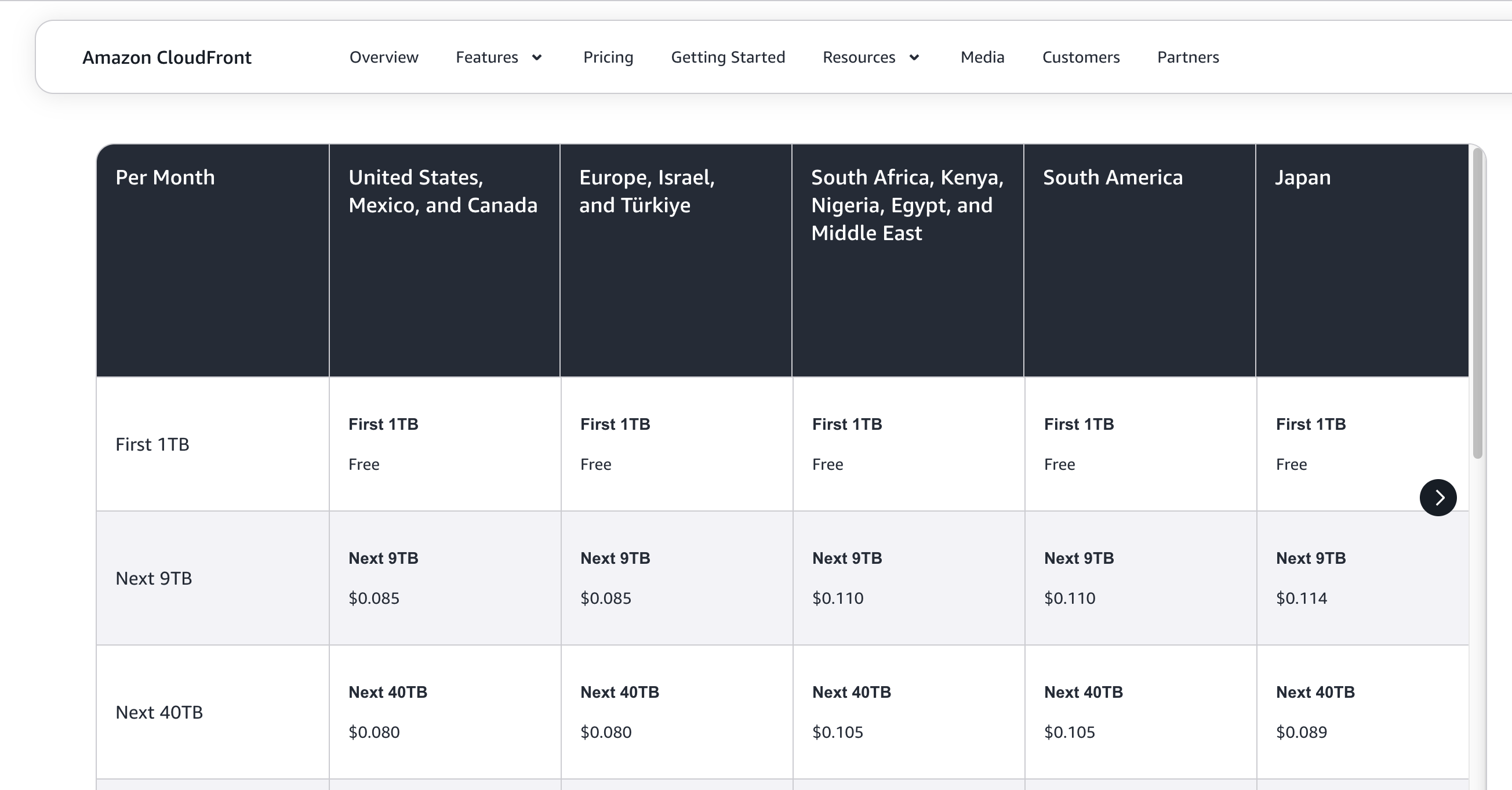
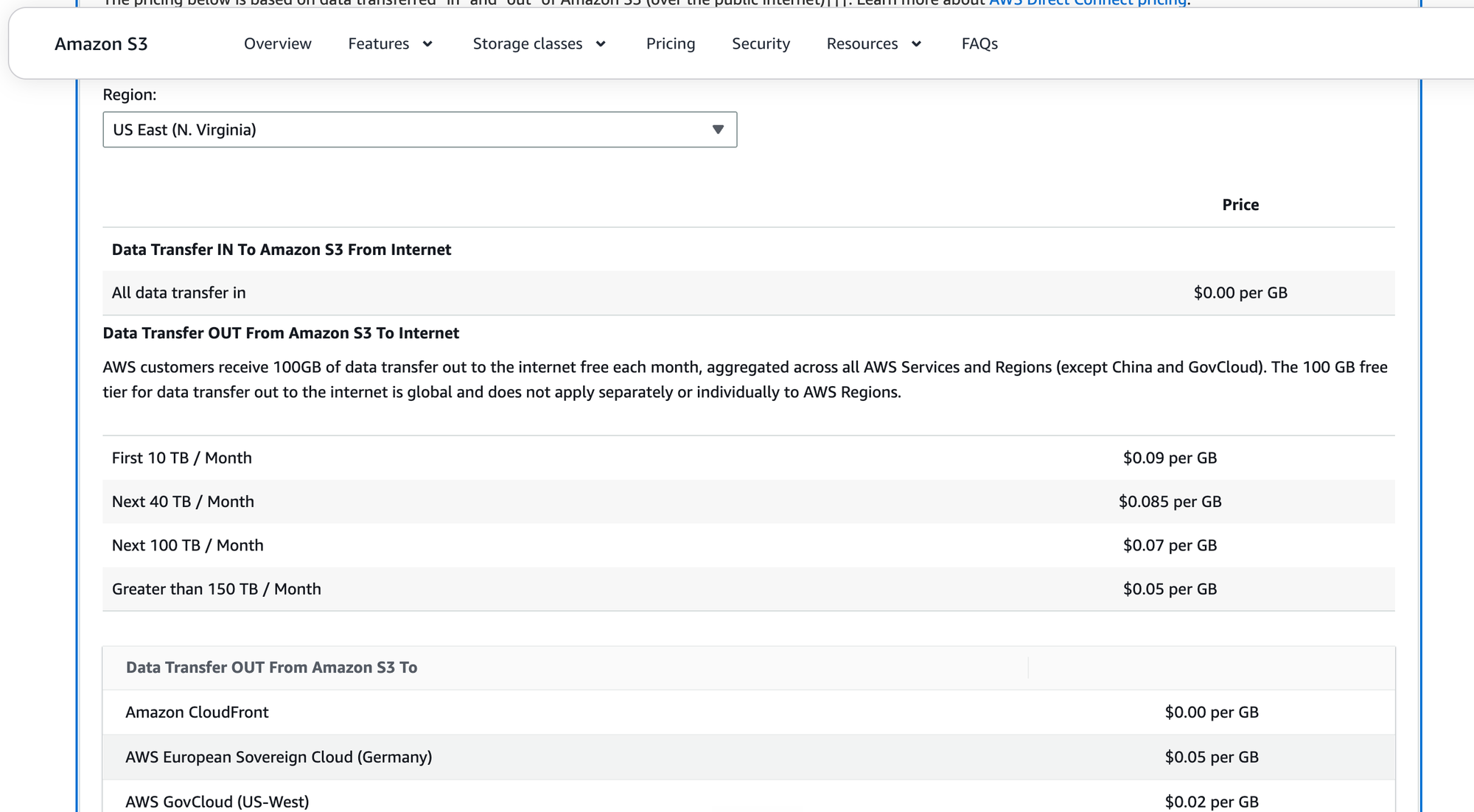
These days, CDN delivery costs are at or below most cloud egress rates. Compare CloudFront and S3 egress and you'll see it's almost always cheaper to serve S3 objects through CloudFront (or Cloudflare) than directly from S3. When I wrote this, CloudFront was about 5 cents per GB cheaper than S3 across every pricing tier in the US (and S3-to-CloudFront transfer is free).
(Pricing changes, check the current numbers: S3 pricing · CloudFront pricing.)
Use long TTLs (or Expires) for JS and CSS (behind a CDN)
If you serve static JavaScript or CSS, put it behind a CDN.
Thanks to webpack, gulp, and friends, most developers now default to long TTLs for these assets, because the build tools embed a checksum or version number in the URL for JS, CSS, and often minified images too. When the file changes, the URL changes, so a long cache is safe.
What still surprises me is how many people serve these static assets straight from their web server (an Nginx box, or worse, a gunicorn or Node process) instead of from object or static storage fronted by a CDN.
One caveat: CDN caching doesn't work for server-side-rendered (SSR) pages out of the box. It does still work for images.
Serve your whole homepage from the edge
Versioned JS, CSS, and images are the obvious candidates, but you can often cache the entire homepage too, even a server-side-rendered one, as long as anonymous users all see the same thing. Configure your CDN to serve the cached copy only to anonymous visitors, and to bypass the cache for anyone sending a cookie.
"Always on": serve stale when the origin is down
I first saw this called "Always Online" on Cloudflare. The idea: your origin can be down, but if the CDN already has a copy of the page, it keeps serving it. Customers may not even notice anything's wrong until they try to interact with the site. Others call it "serve stale," but the concept is the same, and it's solid.
A few rules of thumb:
- If your site doesn't change per customer, it can be cached.
- The CDN can serve an older version of a page when the origin throws errors. Customers don't see transient errors.
- This works for HTML pages and JSON APIs alike, as long as your app can tolerate serving a slightly older response.
Common mistakes (and how to design around them)
I obviously think you should cache with a CDN, but I also see the same mistakes over and over. Design your caching with these considerations in mind:
- Does the cache key include query parameters?
- Watch your Vary headers.
- Don't cache fast-changing files for too long.
- Tune your downstream (client) cache headers.
- Negative caching for 4xx/5xx?
- Know how long things have been cached.
- Track your cache-hit ratio.
- Watch origin traffic drop.
Does your cache key include query parameters?
What's the cache key for each page, are you including query parameters or stripping them? What happens if someone tacks on a random parameter; does it become a new key? When a visitor clicks a Google or Facebook ad and arrives with and UTM parameters, do those bust your cache? (A known parameter can also be handy when your team wants to force an uncached response.) Is your key based on the edge domain or the origin domain? Will the same page be served under multiple domains or subdomains? Getting the cache key right, and being deliberate about query parameters, is the foundation of good caching.
Watch your Vary headers
Your cache key isn't built from the path and query string alone, some request headers feed into it too, and is the big one. If you serve gzip- or brotli-compressed responses, the encoding becomes part of the key, so a Brotli client won't be handed a gzip copy meant for someone else. The same mechanism applies to cookies: if a page differs per customer, adding the cookie to keeps one user's page from being served to another. But Vary-on-cookie is a crude safeguard, if a page is genuinely per-customer, the better move is usually to not cache it at all. Either way, look closely at your headers.
Don't cache fast-changing files for too long
Once you see how well caching works, it's tempting to crank every TTL way up, it cuts origin load and egress costs. But if a file changes quickly, a long TTL will serve stale content, so keep those TTLs short and make sure you can purge caches automatically. Most CDNs honor the header from your origin, so you can keep TTL control on your side.
Tune your downstream (client) cache headers
Most people already do some of this, again thanks to webpack. Just as query parameters and matter, you can control whether something is cached only on the CDN or on the client too. Often I'm happy to pass all the cache headers, and the rest, straight through to the browser. Other times I'll limit client-side caching while letting the CDN keep caching freely.
Negative caching for 4xx/5xx?
This one comes up constantly from first-time CDN users: should you cache 4xx and 5xx responses? If you're just starting out, no, don't cache errors at all. Once you have more experience, you'll find you can cache errors deliberately: it acts like a circuit breaker, letting the CDN return 5xx for the next ten seconds or so without hammering a struggling origin, which gives the backend room to recover. I wouldn't recommend negative caching until you understand the implications, it's advanced, under-the-hood stuff, in the same family as "serve stale." Use it carefully.
Know how long things have been cached
Most CDNs let you discover the cache key and the TTL (both at the edge and downstream) via special debug headers or query strings on the request. Make sure your team knows how to read their cache keys and their CDN and downstream TTLs. Set TTLs for diffeerent types of files / objects / APIs etc. differently.
Track your cache-hit ratio
How do you know caching is actually working? If I could watch only one metric, it'd be cache-hit ratio. If you have an API that's highly cacheable, for seconds, minutes, or days, and your edge or mid-tier hit ratio isn't climbing past ~95%, something's off. Likely suspects: a misconfigured header, a bad cache key, or too many distinct keys that each see too little traffic.
Watch origin traffic drop
The other obvious signal: does origin traffic actually fall? If origin load isn't dropping, or worse, rises right along with a traffic spike, your cache and proxy setup deserves a close look.
Bottom line
If you run any real website or serious application, add a CDN to your stack. It's cheap, it's quick, and your users (and your origin servers) will thank you.